
After a lot of fighting I finally got my UMTS card working with Fedora 9.
I have a T-Mobile Web’n’Walk II card which turns out to be a Option GEO201 by Qualcomm. The main problem with this card is that someone had the wonderful idea of integrating a usb flash drive (so you don’t ever loose the drivers) with a usb gsm modem.
The main trick is to use a small program called usb_modeswitch which disables the flash drive and loads the modem’s driver. So lets cut the chat and get it done:
- Go to http://www.draisberghof.de/usb_modeswitch/ and download the latest version of the file.
- Make sure you have libusb + libusb-devel + lsusb installed$ sudo yum install libusb libusb-devel usbutils
- Unpack, build and install the usb_modeswitch.
$ mkdir ~/tmp
$ cd ~/tmp
$ tar jxvf ~/Download/usb_modeswitch-0.9.4.tar.bz2 # or a newer version
$ cd ~/tmp/usb_modeswitch-0.9.4
$ ./compile.sh
$ sudo install -m755 -o root usb_modeswitch /usr/sbin
$ sudo install -m744 -o root usb_modeswitch.conf /etc/ - Now lets setup udev so it automagically runs usb_modeswitch when the card is inserted. This gives us the plug ‘n play behaviour. This we will do as root.
$ /bin/su –
# vi /etc/udev/rules.d/70-persistent-net.rules
#### => Insert the following text:#Globetrotter HSDPA Modem T-Mobile Web’n’Walk Express II
#Bus 002 Device 003: ID 0af0:6701 Option
#idVendor=05c6, idProduct=1000 are the infos of the flash drive
#idVendor=0af0, idProduct=6701 are the infos of the HSDPA ModemSUBSYSTEM==”usb”, ATTR{idProduct}==”1000″, ATTR{idVendor}==”05c6″, RUN+=”/usr/sbin/usb_modeswitch”
- Make sure that the ” are correct, and that the copy paste doesn’t screw them up (got reports that it does)
- Setup the card using the network manager. Here is my setup for T-Mobile in Germany
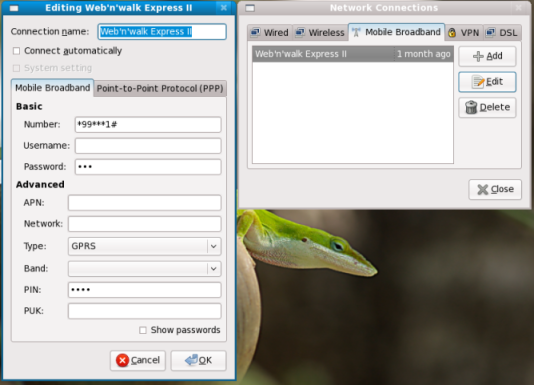
Note: The values I used for the udev script I got from running: # lsusb -v
Well hope that sets you up to go. This should work with other Linux distributions as well
Thanks Per Lasse for the comments and corrections 😀
Updates:
11.12.2007: I upgraded my laptop to Fedora 10 and it works flawless
Tested it in Ubuntu 8.04 LTS and 8.10


